GM, Miles here!
I’m sure you’ve seen the posts online from people claiming they “audited a Google Ads account in x minutes with AI”.
Let me break it to you real quick: this is total BS.
…Or at least, it is if it’s anything more than a “let me check the campaign settings” audit.
Don’t fall for the clickbait.
I recently audited a new client’s account with PPC OS (our AI-powered system for Google Ads that runs on Claude Code, available in The PPC Hub).
PPC OS is already super powerful. It audits settings, feeds, tracking, bidding, budgets, landing pages, and offers, analyzes data over long timeframes, and more.
But it’s never a one-shot where the entire account is audited and I’m done with it. That’s just LinkedIn hypey BS.
Even with AI, the audit took me two full days to complete.
But the difference is that AI helped me find deeper insights that I would not have found myself.
So today, I wanna take you behind the scenes of how I audited a real account with AI: the boring parts, where AI made the difference, and where it messed up.
Consider this an honest counter to the clickbaity BS that’s currently dominating the LinkedIn and YouTube feeds.
Hopefully it gives you some insights into how you can improve your own audits using AI (while also being aware of the things AI can’t do well).
Let’s dive in!
What I actually mean by “AI” here
Quick bit of context, because “AI” means a hundred different things right now.
I’m not talking about pasting a spreadsheet into ChatGPT or Claude and asking for takes.
I used PPC OS, our AI-powered system for Google Ads that uses agents to complete real tasks.
It’s fully custom, it runs locally on my own machine through Claude Code, and it’s built on our own operating system for Google Ads: basically everything Bob and I know about running accounts, written down and turned into AI-ready skills Claude Code can execute.
It has memory, and I provide context to it so it understands my specific situation.
I’m not trying to turn this into a pitch for PPC OS, but it helps to understand what I’m using, because it’s different from regular LLMs like ChatGPT and Claude where you drop CSV files and ask for specific outputs.
I can just point PPC OS at one part of the account (tracking, bidding, search terms, placements, structure, landing pages, etc.) and it works through that part the way I would, because it’s using our methodology, not generic best-practice fluff scraped off the internet.
PPC OS works because the inputs are good.
Ok, now it’s time to dig into the actual audit process, which consisted of 4 phases:
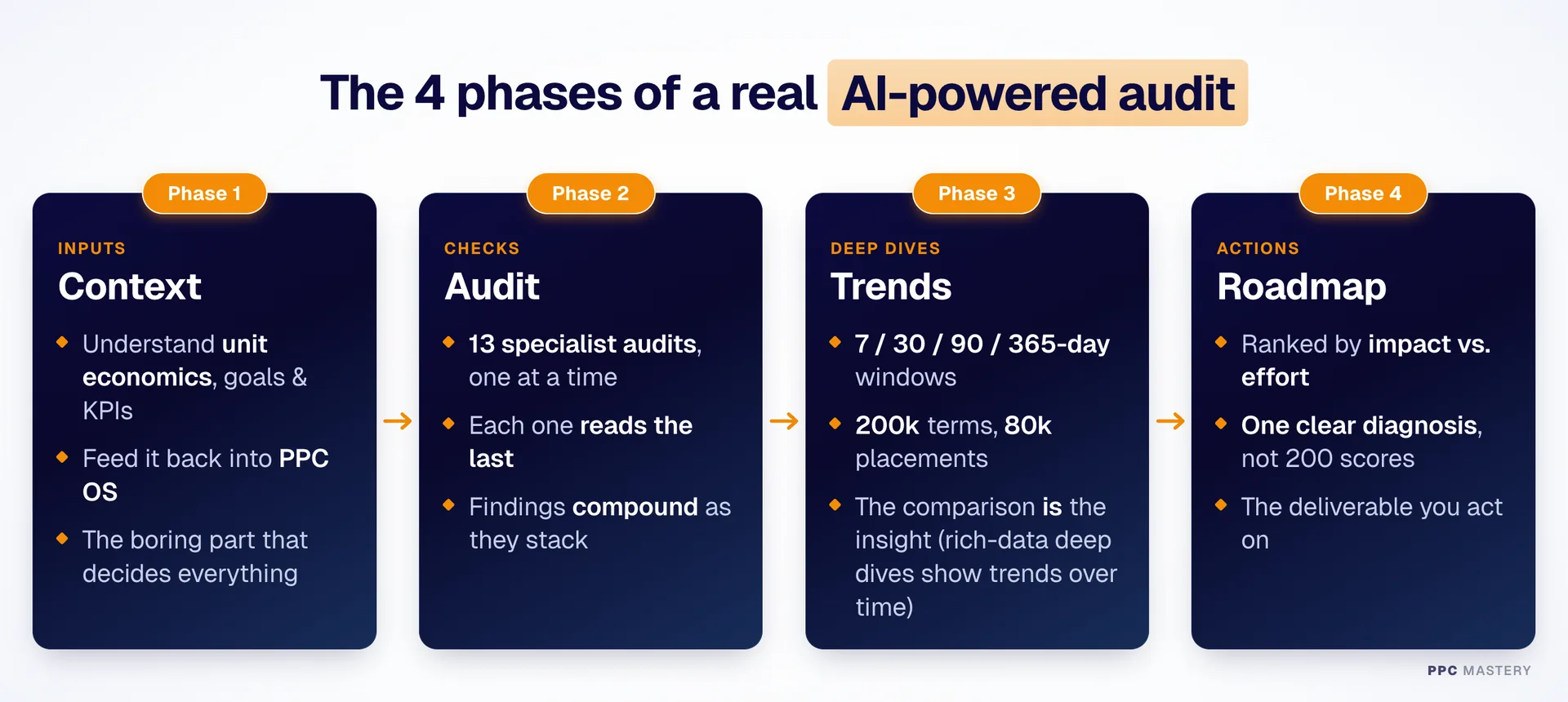
Phase 1: Context — getting brutally clear on the numbers (the boring part that matters most)
Before I even started auditing, I spent a few hours just gathering context.
It’s totally unsexy, but it made the biggest difference for my outputs.
I used PPC OS to gain initial insights into how the account was performing, and drafted 30+ questions that I sent to my client for additional context and to get clarity on their goals and unit economics:
- What are your current and long-term goals?
- What’s more important: growth or efficiency?
- What are your targets and KPIs?
- What’s a customer worth over their lifetime (LTV)?
- What’s your average churn and retention rate?
- What do your profit margins look like?
- How long until a customer turns profitable (the payback window)?
These are just examples. I asked many more questions that were relevant to the client’s specific case.
I needed those answers before I could continue, because they determine how I look at the data and the decisions I make based on it.
Once I handed the numbers and context to PPC OS, it could analyze the whole account through the lens of the client’s actual goals and unit economics — and that made a huge difference.
Instead of judging campaigns against generic benchmarks, it judged them against real business numbers.
This phase is boring, but I spent extra time here to make sure I had everything I needed before kicking off the actual audit.
Phase 2: Audit — 13 small audits that stack on top of each other
After gathering the context, I used PPC OS to audit the account with 13 separate specialized audits, one at a time.
In case you’re unfamiliar: in Claude Code, you can run “skills”, which are reusable sets of instructions that let AI agents execute a specific task.
I used our skills to audit conversion tracking, the offer, account structure, keywords, search terms, bid strategies, budgets, competitor comparison, placements, Quality Scores, campaign settings, landing pages, RSAs, and more.
It’s not one giant “audit everything at once” button — that doesn’t really work with AI. Once you give it too much to do at once, it will drift and hallucinate and not execute the task the way you intended.
So I executed the audit one skill at a time. The insights from each run got saved to a memory log, so every finding fed into the next checks. It surprised me how effective PPC OS was at compounding the learnings.
That kind of compounding is something I could never keep track of manually.
Phase 3: Trends — data deep dives across different time ranges (the awesome part)
This is where the AI magic really started to become visible.
I’d gathered context and audited every single aspect of the account with specialized skills to deeply understand the account.
The next step was to do data deep dives and find trends across 7, 30, 90, and 365-day lookback windows.
PPC OS looked at overall performance across the account, 200K+ search terms, keywords, 80K+ placements (Demand Gen), landing pages, RSA data and more, and compared those across a 7, 30, 90, and 365-day window to spot trends.
And the insights I got from that were really insane.
Doing that by hand would’ve been damn near impossible.
With PPC OS, I ran it, went and got a coffee, and came back to an extremely detailed performance and trends report.
To me, the big benefit of using AI while auditing an account isn’t to “save time” and claim I completed it in “a few minutes”. The big benefit is getting deeper insights, so I understand the account better and give better advice on what to do next.
Phase 4: Roadmap — structuring the findings into a coherent action plan
Each skill run gave me a PDF report with valuable insights, but it’s not something I want to share with my client because it would just overwhelm them.
So I had to take all the raw material and insights and structure it all into a coherent action plan.
I like to prioritize my findings based on impact vs effort, so we know exactly what to do first, and what comes after.
Thanks to PPC OS, I found out that this client had a coverage problem: their growth goals were ambitious and their unit economics were healthy enough to reach them, but they weren’t getting in front of enough of the market.
This is a fundamentally healthy business — their biggest bottleneck to growth was traffic.
So the main action plan revolved around getting more (high-quality) traffic so we could scale further.
That was literally the only thing holding them back (pretty good bottleneck to have!).
The right question wasn’t “how do we reduce waste”, but “how do we get more high-quality traffic?”
AI has helped me a lot, but it’s not perfect
PPC OS is really good, but it’s not magic. It works well because it’s programmed by our custom operating system with everything we know about Google Ads.
But I also want to be honest about where AI still falls short.
AI is not perfect, at all, and it can (and will) make mistakes. That’s why I constantly fact-checked everything it produced.
When I tried to let it do too much at once, I noticed it started to drift and hallucinate. They call this “context rot”, which happens when the “context window” gets too full (for your reference: Claude Code can handle 1 million tokens before it has to reset, but I’ve seen major hallucinations happen after 200-400K tokens).
The solution is to give it micro tasks to run and start a new task in a new, fresh chat every time. Worked very well for me!
But apart from that, I think the biggest danger to auditing accounts with AI is if you try to let it complete tasks based on the generic knowledge it gets from the internet.
That’s why it’s soooo essential to create your own custom operating system that tells Claude Code (or your AI tool) how to do a task YOUR way.
We’ve created PPC OS in that very way, programmed with how Bob and I think Google Ads should be done. It’s trusted by 2,400+ Google Ads Specialists in The PPC Hub. They can use it out of the box or completely customize it to their needs.
Using a custom operating system made the biggest difference to me when auditing this real account with AI. I could not have done it without it.
So no, you cannot do proper Google Ads audits in a few minutes with AI
But you can get deeper insights faster.
It’s fast, reads everything… and occasionally makes mistakes if you’re not paying attention.
But pair AI with someone who knows what they’re doing, and you have a specialist with superpowers.
The better your expertise, the more your AI system gives you.
That’s what I noticed while auditing this account with PPC OS.
Final note
Do you want to improve your Google Ads audits with the power of AI? I’m not talking about that 90-second BS version that produces garbage outputs, but the real one that takes real effort to get real results… Then you’ll enjoy using PPC OS.
It’s the same AI-powered system I used for the audit I described in this issue. It’s fully customizable, programmed with our proven strategies that drive results, and turned into AI-ready skills you can run locally through Claude Code for all your clients.
Access is exclusive to The PPC Hub. Don’t worry if it sounds technical. It’s actually super simple to get started with our full step-by-step setup guide that takes you from zero to actually running it, even if you’ve never used Claude Code or AI agents before.
With PPC OS, you’ll feel like you have superpowers.
Feel free to join 2,400+ specialists in The PPC Hub.
That’s all for today, thank you for reading.
See you next week!
Cheers,
Miles (& Bob)